Basic Example#
In this basic example, we define an experiment that compares performance of calculating a value, run a batch version of it, examine the results saved to disk and then work with the results programmatically.
Setup an experiment#
In this experiment, we are comparing different ways to calculate a product. We will implement a function for each way to calculate the value. We want to be able to test it on a particular set of values and compare what it does. The calculation we are interested takes in two values, so each function will too. For the experiment we want to store the result and some stats for each test case.
This is an overly simplified example, but has the basic structure of common experiments:
multiple inputs
of different types (numbers and functions)
returns what will be used as a single row in later data analysis
import pandas as pd
import numpy as np
import timeit

def evaluate_multiplication(p1, p2, f):
    '''
    compute the product of p1*p2 using f and some stats about the performance

    Parameters
    ----------
    p1 : int
        multiplicand
    p2 : int
        multiplicator
    f : function
        a function that returns a product from two parameters

    Returns
    -------
    result_df : DataFrame
        a single row dataframe with results of the experiment
    '''
    product = f(p1,p2)
    # check if the product is correct per core / operator
    stat1 = product/p1 == p2
    # check that it evaluates consistently
    stat2 = f(p1,p2) == f(p2,p1)
    # check timing
    fx = lambda : f(p1,p2)
    time = timeit.Timer(fx).timeit(number =100)
    # store results to save in a pandas data type
    result_S = pd.Series(data= [product,stat1,stat2,time],
                       index= ['product','stat1','stat2','time'])
    # convert single row of results in a series to a data frame
    result_df = result_S.to_frame().T
    return result_df
We can see this is a very simple experiment by calling it using one candidate for f
a simple wrapper to the Python multiplciation operator:
def python_prod_operator(a,b):
    return a*b

evaluate_multiplication(3,5,python_prod_operator)
| product | stat1 | stat2 | time | |
|---|---|---|---|---|
| 0 | 15 | True | True | 0.000008 |
We see that we get a single row of a DataFrame with our results here.
And we can call it with different inputs:
evaluate_multiplication(2,7,python_prod_operator)
| product | stat1 | stat2 | time | |
|---|---|---|---|---|
| 0 | 14 | True | True | 0.000007 |
Create a Parameter Grid#
The keys of the parameter grid have to match the parameter names of your experiment function, the values should be an iterable type, but the contents of that iterable can be anything.
Most of the time this means that the values will be lists of items that are the type of whatever your experiment function accepts as parameters.
Simple parameters#
Here we want pass integers to p1 and p2, so we will have lists of integers for these two values.
For this demo, we will save those lists to their own variables, but you could define the lists directly in your parameter grid.
p1_list = [1,2,3,4]
p2_list = [20,33,40,5000]
Function parameters#
This experiment aims to compare different functions, so we need to define those too In this case, we’ll make functions that calculate a product with different types of casting.
def base_python_repeat_sum(a,b):
    return sum([a]*b)

def numpy_product(a,b):
    return np.prod([a,b])

def numpy_repeat_sum(a,b):
    return np.asarray(a).repeat(b).sum()

fx_list = [python_prod_operator,base_python_repeat_sum,numpy_product,
                        numpy_repeat_sum]
Building the Parameter Grid#
Finally we put it all together in the parameter grid, which is a dictionary.
They keys of the parameter grid match parameters of the experiment function, recall our function is:
help(evaluate_multiplication)
Help on function evaluate_multiplication in module __main__:

evaluate_multiplication(p1, p2, f)
    compute the product of p1*p2 using f and some stats about the performance

    Parameters
    ----------
    p1 : int
        multiplicand
    p2 : int
        multiplicator
    f : function
        a function that returns a product from two parameters

    Returns
    -------
    result_df : DataFrame
        a single row dataframe with results of the experiment
So our keys will be 'p1','p2','f':
param_grid = {'p1':p1_list,
             'p2':p2_list,
              'f':fx_list}
Create a directory to save the results#
If needed, do this, but this does not need to be in your code.
import os
if not(os.path.isdir('results')):
    os.mkdir('results')
expttools will look for a results folder in your current working directory to save
results in if you do not pass it a path later. We have created this folder here so
that later in this demo we can use the default values.
Create the object#
Next we will import the Experiment object, typically this might be at the top of a script, but we have not used
it yet, so we import here for illustrative purposes.
from expttools import Experiment
and then instantiate the object by passing it your function, here evaluate_multiplication, and
parameter grid, here param_grid.
my_expt = Experiment(evaluate_multiplication,param_grid)
Now we have an Experiment object:
type(my_expt)
expttools.batch_run.Experiment
Validate an Experiment#
Once we create it, we can test it to confirm the object is constructed well
help(my_expt.run_test)
Help on method run_test in module expttools.batch_run:

run_test(param_i=None, verbose=False) method of expttools.batch_run.Experiment instance
    Call the function with a single (default first) value of each parameter
    and return the result. throws warnings if save format is incompatible with
    ExperimentResult

    Parameters
    ----------
    param_i : list
        list of ints to use as the index for each parameter in order they
        appear in the parameter grid
    verbose : boolean
        display maximum outputs

    Returns
    -------
    cur_name : string
        name of the tested case
    expt_result : (df)
        what the experiment function returns
Now let’s test our example
first_res_name, first_res_df = my_expt.run_test()
print(first_res_name)
first_res_df
1_20_python_prod_operator
| product | stat1 | stat2 | time | |
|---|---|---|---|---|
| 0 | 20 | True | True | 0.000007 |
it returns a sample name and a sample result so you can confirm they are what you expect and will be able to analyze later.
We can also check that each result will be saved to a unique directory.
With default ways to instantiate the object, this would only fail if your parameter values repeat.
Customizing the naming function#
We can also peek at how the results will be saved by default:
my_expt.get_name_list()
['1_20_python_prod_operator',
 '1_20_base_python_repeat_sum',
 '1_20_numpy_product',
 '1_20_numpy_repeat_sum',
 '1_33_python_prod_operator',
 '1_33_base_python_repeat_sum',
 '1_33_numpy_product',
 '1_33_numpy_repeat_sum',
 '1_40_python_prod_operator',
 '1_40_base_python_repeat_sum',
 '1_40_numpy_product',
 '1_40_numpy_repeat_sum',
 '1_5000_python_prod_operator',
 '1_5000_base_python_repeat_sum',
 '1_5000_numpy_product',
 '1_5000_numpy_repeat_sum',
 '2_20_python_prod_operator',
 '2_20_base_python_repeat_sum',
 '2_20_numpy_product',
 '2_20_numpy_repeat_sum',
 '2_33_python_prod_operator',
 '2_33_base_python_repeat_sum',
 '2_33_numpy_product',
 '2_33_numpy_repeat_sum',
 '2_40_python_prod_operator',
 '2_40_base_python_repeat_sum',
 '2_40_numpy_product',
 '2_40_numpy_repeat_sum',
 '2_5000_python_prod_operator',
 '2_5000_base_python_repeat_sum',
 '2_5000_numpy_product',
 '2_5000_numpy_repeat_sum',
 '3_20_python_prod_operator',
 '3_20_base_python_repeat_sum',
 '3_20_numpy_product',
 '3_20_numpy_repeat_sum',
 '3_33_python_prod_operator',
 '3_33_base_python_repeat_sum',
 '3_33_numpy_product',
 '3_33_numpy_repeat_sum',
 '3_40_python_prod_operator',
 '3_40_base_python_repeat_sum',
 '3_40_numpy_product',
 '3_40_numpy_repeat_sum',
 '3_5000_python_prod_operator',
 '3_5000_base_python_repeat_sum',
 '3_5000_numpy_product',
 '3_5000_numpy_repeat_sum',
 '4_20_python_prod_operator',
 '4_20_base_python_repeat_sum',
 '4_20_numpy_product',
 '4_20_numpy_repeat_sum',
 '4_33_python_prod_operator',
 '4_33_base_python_repeat_sum',
 '4_33_numpy_product',
 '4_33_numpy_repeat_sum',
 '4_40_python_prod_operator',
 '4_40_base_python_repeat_sum',
 '4_40_numpy_product',
 '4_40_numpy_repeat_sum',
 '4_5000_python_prod_operator',
 '4_5000_base_python_repeat_sum',
 '4_5000_numpy_product',
 '4_5000_numpy_repeat_sum']
Name Template strings#
We will make a template string that has the function name, underscore then the two parameters with an x between. Since we only want to change the format we can specify a name format
name_template = '{f}-{p1}x{p2}'
my_expt_name_template = Experiment(evaluate_multiplication,param_grid,name_format=name_template)
my_expt_name_template.get_name_list()
['python_prod_operator-1x20',
 'base_python_repeat_sum-1x20',
 'numpy_product-1x20',
 'numpy_repeat_sum-1x20',
 'python_prod_operator-1x33',
 'base_python_repeat_sum-1x33',
 'numpy_product-1x33',
 'numpy_repeat_sum-1x33',
 'python_prod_operator-1x40',
 'base_python_repeat_sum-1x40',
 'numpy_product-1x40',
 'numpy_repeat_sum-1x40',
 'python_prod_operator-1x5000',
 'base_python_repeat_sum-1x5000',
 'numpy_product-1x5000',
 'numpy_repeat_sum-1x5000',
 'python_prod_operator-2x20',
 'base_python_repeat_sum-2x20',
 'numpy_product-2x20',
 'numpy_repeat_sum-2x20',
 'python_prod_operator-2x33',
 'base_python_repeat_sum-2x33',
 'numpy_product-2x33',
 'numpy_repeat_sum-2x33',
 'python_prod_operator-2x40',
 'base_python_repeat_sum-2x40',
 'numpy_product-2x40',
 'numpy_repeat_sum-2x40',
 'python_prod_operator-2x5000',
 'base_python_repeat_sum-2x5000',
 'numpy_product-2x5000',
 'numpy_repeat_sum-2x5000',
 'python_prod_operator-3x20',
 'base_python_repeat_sum-3x20',
 'numpy_product-3x20',
 'numpy_repeat_sum-3x20',
 'python_prod_operator-3x33',
 'base_python_repeat_sum-3x33',
 'numpy_product-3x33',
 'numpy_repeat_sum-3x33',
 'python_prod_operator-3x40',
 'base_python_repeat_sum-3x40',
 'numpy_product-3x40',
 'numpy_repeat_sum-3x40',
 'python_prod_operator-3x5000',
 'base_python_repeat_sum-3x5000',
 'numpy_product-3x5000',
 'numpy_repeat_sum-3x5000',
 'python_prod_operator-4x20',
 'base_python_repeat_sum-4x20',
 'numpy_product-4x20',
 'numpy_repeat_sum-4x20',
 'python_prod_operator-4x33',
 'base_python_repeat_sum-4x33',
 'numpy_product-4x33',
 'numpy_repeat_sum-4x33',
 'python_prod_operator-4x40',
 'base_python_repeat_sum-4x40',
 'numpy_product-4x40',
 'numpy_repeat_sum-4x40',
 'python_prod_operator-4x5000',
 'base_python_repeat_sum-4x5000',
 'numpy_product-4x5000',
 'numpy_repeat_sum-4x5000']
Parameter String-ifying#
If we want to change how elements are changed to a string, but join them still with _ we can change only the parameter_string dicionary.
For example, we could make the function names to camel case.
title_case_fx = {'f':lambda s: s.__name__.title().replace('_','')}
my_expt_cust_stringify = Experiment(evaluate_multiplication,param_grid,
                                parameter_string = title_case_fx )
my_expt_cust_stringify.get_name_list()
['1_20_PythonProdOperator',
 '1_20_BasePythonRepeatSum',
 '1_20_NumpyProduct',
 '1_20_NumpyRepeatSum',
 '1_33_PythonProdOperator',
 '1_33_BasePythonRepeatSum',
 '1_33_NumpyProduct',
 '1_33_NumpyRepeatSum',
 '1_40_PythonProdOperator',
 '1_40_BasePythonRepeatSum',
 '1_40_NumpyProduct',
 '1_40_NumpyRepeatSum',
 '1_5000_PythonProdOperator',
 '1_5000_BasePythonRepeatSum',
 '1_5000_NumpyProduct',
 '1_5000_NumpyRepeatSum',
 '2_20_PythonProdOperator',
 '2_20_BasePythonRepeatSum',
 '2_20_NumpyProduct',
 '2_20_NumpyRepeatSum',
 '2_33_PythonProdOperator',
 '2_33_BasePythonRepeatSum',
 '2_33_NumpyProduct',
 '2_33_NumpyRepeatSum',
 '2_40_PythonProdOperator',
 '2_40_BasePythonRepeatSum',
 '2_40_NumpyProduct',
 '2_40_NumpyRepeatSum',
 '2_5000_PythonProdOperator',
 '2_5000_BasePythonRepeatSum',
 '2_5000_NumpyProduct',
 '2_5000_NumpyRepeatSum',
 '3_20_PythonProdOperator',
 '3_20_BasePythonRepeatSum',
 '3_20_NumpyProduct',
 '3_20_NumpyRepeatSum',
 '3_33_PythonProdOperator',
 '3_33_BasePythonRepeatSum',
 '3_33_NumpyProduct',
 '3_33_NumpyRepeatSum',
 '3_40_PythonProdOperator',
 '3_40_BasePythonRepeatSum',
 '3_40_NumpyProduct',
 '3_40_NumpyRepeatSum',
 '3_5000_PythonProdOperator',
 '3_5000_BasePythonRepeatSum',
 '3_5000_NumpyProduct',
 '3_5000_NumpyRepeatSum',
 '4_20_PythonProdOperator',
 '4_20_BasePythonRepeatSum',
 '4_20_NumpyProduct',
 '4_20_NumpyRepeatSum',
 '4_33_PythonProdOperator',
 '4_33_BasePythonRepeatSum',
 '4_33_NumpyProduct',
 '4_33_NumpyRepeatSum',
 '4_40_PythonProdOperator',
 '4_40_BasePythonRepeatSum',
 '4_40_NumpyProduct',
 '4_40_NumpyRepeatSum',
 '4_5000_PythonProdOperator',
 '4_5000_BasePythonRepeatSum',
 '4_5000_NumpyProduct',
 '4_5000_NumpyRepeatSum']
and then we can also ensure that the names are all unique
my_expt_cust_stringify.validate_name_func()
True
Preview the result naming#
We can also peek at how the results will be saved and how many there are will be, this allows us to further confirm that we have set up the parameter grid how we really want it to be.
First we will look at the first 5 names
names_list = my_expt.get_name_list()
names_list[:5]
['1_20_python_prod_operator',
 '1_20_base_python_repeat_sum',
 '1_20_numpy_product',
 '1_20_numpy_repeat_sum',
 '1_33_python_prod_operator']
If this is not what we want, we can specify a name_func when we instantiate the Experiment .
Next we will check how many there are
len(names_list)
64
This value will always be the product of the lengths of the lists passed to each parameter through the grid, that is:
len(names_list) == np.prod([len(pl) for pl in param_grid.values()])
np.True_
Run a batch job#
then we can run the whole experiment These can be combined
my_expt_cust_both = Experiment(evaluate_multiplication,param_grid,
                                parameter_string = title_case_fx ,
                                name_format=name_template)
my_expt_cust_both.get_name_list()
['PythonProdOperator-1x20',
 'BasePythonRepeatSum-1x20',
 'NumpyProduct-1x20',
 'NumpyRepeatSum-1x20',
 'PythonProdOperator-1x33',
 'BasePythonRepeatSum-1x33',
 'NumpyProduct-1x33',
 'NumpyRepeatSum-1x33',
 'PythonProdOperator-1x40',
 'BasePythonRepeatSum-1x40',
 'NumpyProduct-1x40',
 'NumpyRepeatSum-1x40',
 'PythonProdOperator-1x5000',
 'BasePythonRepeatSum-1x5000',
 'NumpyProduct-1x5000',
 'NumpyRepeatSum-1x5000',
 'PythonProdOperator-2x20',
 'BasePythonRepeatSum-2x20',
 'NumpyProduct-2x20',
 'NumpyRepeatSum-2x20',
 'PythonProdOperator-2x33',
 'BasePythonRepeatSum-2x33',
 'NumpyProduct-2x33',
 'NumpyRepeatSum-2x33',
 'PythonProdOperator-2x40',
 'BasePythonRepeatSum-2x40',
 'NumpyProduct-2x40',
 'NumpyRepeatSum-2x40',
 'PythonProdOperator-2x5000',
 'BasePythonRepeatSum-2x5000',
 'NumpyProduct-2x5000',
 'NumpyRepeatSum-2x5000',
 'PythonProdOperator-3x20',
 'BasePythonRepeatSum-3x20',
 'NumpyProduct-3x20',
 'NumpyRepeatSum-3x20',
 'PythonProdOperator-3x33',
 'BasePythonRepeatSum-3x33',
 'NumpyProduct-3x33',
 'NumpyRepeatSum-3x33',
 'PythonProdOperator-3x40',
 'BasePythonRepeatSum-3x40',
 'NumpyProduct-3x40',
 'NumpyRepeatSum-3x40',
 'PythonProdOperator-3x5000',
 'BasePythonRepeatSum-3x5000',
 'NumpyProduct-3x5000',
 'NumpyRepeatSum-3x5000',
 'PythonProdOperator-4x20',
 'BasePythonRepeatSum-4x20',
 'NumpyProduct-4x20',
 'NumpyRepeatSum-4x20',
 'PythonProdOperator-4x33',
 'BasePythonRepeatSum-4x33',
 'NumpyProduct-4x33',
 'NumpyRepeatSum-4x33',
 'PythonProdOperator-4x40',
 'BasePythonRepeatSum-4x40',
 'NumpyProduct-4x40',
 'NumpyRepeatSum-4x40',
 'PythonProdOperator-4x5000',
 'BasePythonRepeatSum-4x5000',
 'NumpyProduct-4x5000',
 'NumpyRepeatSum-4x5000']
Name Function#
If you want to handle both the format and the way parameters are cast to string and/or include additional information a full function is best.
Warning
When you use this it overules the parameter_string and template.
namer = lambda cp: cp['f'].__name__ + '_' + str(cp['p1'])+ 'x' + str(cp['p2'])
my_expt_cust_namer = Experiment(evaluate_multiplication,param_grid,name_func=namer)
my_expt_cust_namer.get_name_list()
['python_prod_operator_1x20',
 'base_python_repeat_sum_1x20',
 'numpy_product_1x20',
 'numpy_repeat_sum_1x20',
 'python_prod_operator_1x33',
 'base_python_repeat_sum_1x33',
 'numpy_product_1x33',
 'numpy_repeat_sum_1x33',
 'python_prod_operator_1x40',
 'base_python_repeat_sum_1x40',
 'numpy_product_1x40',
 'numpy_repeat_sum_1x40',
 'python_prod_operator_1x5000',
 'base_python_repeat_sum_1x5000',
 'numpy_product_1x5000',
 'numpy_repeat_sum_1x5000',
 'python_prod_operator_2x20',
 'base_python_repeat_sum_2x20',
 'numpy_product_2x20',
 'numpy_repeat_sum_2x20',
 'python_prod_operator_2x33',
 'base_python_repeat_sum_2x33',
 'numpy_product_2x33',
 'numpy_repeat_sum_2x33',
 'python_prod_operator_2x40',
 'base_python_repeat_sum_2x40',
 'numpy_product_2x40',
 'numpy_repeat_sum_2x40',
 'python_prod_operator_2x5000',
 'base_python_repeat_sum_2x5000',
 'numpy_product_2x5000',
 'numpy_repeat_sum_2x5000',
 'python_prod_operator_3x20',
 'base_python_repeat_sum_3x20',
 'numpy_product_3x20',
 'numpy_repeat_sum_3x20',
 'python_prod_operator_3x33',
 'base_python_repeat_sum_3x33',
 'numpy_product_3x33',
 'numpy_repeat_sum_3x33',
 'python_prod_operator_3x40',
 'base_python_repeat_sum_3x40',
 'numpy_product_3x40',
 'numpy_repeat_sum_3x40',
 'python_prod_operator_3x5000',
 'base_python_repeat_sum_3x5000',
 'numpy_product_3x5000',
 'numpy_repeat_sum_3x5000',
 'python_prod_operator_4x20',
 'base_python_repeat_sum_4x20',
 'numpy_product_4x20',
 'numpy_repeat_sum_4x20',
 'python_prod_operator_4x33',
 'base_python_repeat_sum_4x33',
 'numpy_product_4x33',
 'numpy_repeat_sum_4x33',
 'python_prod_operator_4x40',
 'base_python_repeat_sum_4x40',
 'numpy_product_4x40',
 'numpy_repeat_sum_4x40',
 'python_prod_operator_4x5000',
 'base_python_repeat_sum_4x5000',
 'numpy_product_4x5000',
 'numpy_repeat_sum_4x5000']
and then we can also ensure that the names are all unique
my_expt_cust_namer.validate_name_func()
True
Look at the result directory structure#
Then run
batchname, successes ,fails = my_expt.run_batch()
This returns a few important things:
the
batchnameis the name of the folder that contains all of the sub folders named as we saw innames_listabove.successesandfailsare lists of run names, that is items in thenames_list
This means that the following will always be true.
len(successes) + len(fails) == len(names_list)
True
Any runs that succeed, the name is in the successes list, for parameter values that the experiment function fails, the name of that run is added to fails. For the ones that fail, an empty result file and a log with the error message are saved.
In our case the batch name has the datestamp and name of the function
batchname
'evaluate_multiplication2025_10_07_00_38_26_461170'
and we can see it created a subfolder in the results dir with that name
We created that folder
%%bash
ls results/
evaluate_multiplication2025_10_07_00_38_26_461170
Then we can look in that folder to see directories for each run name
%%bash -s "$batchname"
ls results/$1
1_20_base_python_repeat_sum
1_20_numpy_product
1_20_numpy_repeat_sum
1_20_python_prod_operator
1_33_
base_python_repeat_sum
1_33_numpy_product
1_33_numpy_repeat_sum
1_33_python_prod_operator
1_40_base_
python_repeat_sum
1_40_numpy_product
1_40_numpy_repeat_sum
1_40_python_prod_operator
1_5000_base_pyt
hon_repeat_sum
1_5000_numpy_product
1_5000_numpy_repeat_sum
1_5000_python_prod_operator
2_20_base_py
thon_repeat_sum
2_20_numpy_product
2_20_numpy_repeat_sum
2_20_python_prod_operator
2_33_base_python_
repeat_sum
2_33_numpy_product
2_33_numpy_repeat_sum
2_33_python_prod_operator
2_40_base_python_repea
t_sum
2_40_numpy_product
2_40_numpy_repeat_sum
2_40_python_prod_operator
2_5000_base_python_repeat_s
um
2_5000_numpy_product
2_5000_numpy_repeat_sum
2_5000_python_prod_operator
3_20_base_python_repeat_
sum
3_20_numpy_product
3_20_numpy_repeat_sum
3_20_python_prod_operator
3_33_base_python_repeat_sum
3
_33_numpy_product
3_33_numpy_repeat_sum
3_33_python_prod_operator
3_40_base_python_repeat_sum
3_40_n
umpy_product
3_40_numpy_repeat_sum
3_40_python_prod_operator
3_5000_base_python_repeat_sum
3_5000_nu
mpy_product
3_5000_numpy_repeat_sum
3_5000_python_prod_operator
4_20_base_python_repeat_sum
4_20_num
py_product
4_20_numpy_repeat_sum
4_20_python_prod_operator
4_33_base_python_repeat_sum
4_33_numpy_pr
oduct
4_33_numpy_repeat_sum
4_33_python_prod_operator
4_40_base_python_repeat_sum
4_40_numpy_product
4_40_numpy_repeat_sum
4_40_python_prod_operator
4_5000_base_python_repeat_sum
4_5000_numpy_product
4_5000_numpy_repeat_sum
4_5000_python_prod_operator
dependency_versions.txt
Load Results to work with them#
from expttools import ExperimentResult
we instantiate the result object with a top level directory where the results were saved.
my_results = ExperimentResult('results/'+batchname)
this object will list all of the results that succeeded
my_results.get_result_names()
['1_33_python_prod_operator',
 '4_40_numpy_product',
 '2_20_numpy_product',
 '3_5000_python_prod_operator',
 '2_20_python_prod_operator',
 '2_5000_python_prod_operator',
 '3_40_base_python_repeat_sum',
 '3_20_numpy_product',
 '1_40_numpy_product',
 '2_40_python_prod_operator',
 '3_33_numpy_product',
 '1_20_base_python_repeat_sum',
 '1_40_python_prod_operator',
 '3_40_numpy_repeat_sum',
 '1_5000_numpy_product',
 '2_5000_numpy_product',
 '1_20_python_prod_operator',
 '1_33_base_python_repeat_sum',
 '1_40_numpy_repeat_sum',
 '3_20_base_python_repeat_sum',
 '2_40_base_python_repeat_sum',
 '3_33_base_python_repeat_sum',
 '4_5000_numpy_product',
 '2_20_base_python_repeat_sum',
 '4_5000_python_prod_operator',
 '4_20_python_prod_operator',
 '4_40_numpy_repeat_sum',
 '3_33_python_prod_operator',
 '2_5000_numpy_repeat_sum',
 '1_20_numpy_product',
 '4_20_numpy_repeat_sum',
 '3_20_numpy_repeat_sum',
 '3_5000_numpy_product',
 '4_40_python_prod_operator',
 '1_5000_base_python_repeat_sum',
 '4_5000_numpy_repeat_sum',
 '4_33_numpy_repeat_sum',
 '2_5000_base_python_repeat_sum',
 '1_40_base_python_repeat_sum',
 '2_40_numpy_repeat_sum',
 '2_33_python_prod_operator',
 '4_33_numpy_product',
 '3_40_numpy_product',
 '2_33_base_python_repeat_sum',
 '2_40_numpy_product',
 '4_40_base_python_repeat_sum',
 '1_5000_python_prod_operator',
 '2_33_numpy_product',
 '4_20_base_python_repeat_sum',
 '3_20_python_prod_operator',
 '2_33_numpy_repeat_sum',
 '4_33_python_prod_operator',
 '4_33_base_python_repeat_sum',
 '4_20_numpy_product',
 '4_5000_base_python_repeat_sum',
 '1_33_numpy_repeat_sum',
 '3_5000_numpy_repeat_sum',
 '2_20_numpy_repeat_sum',
 '1_33_numpy_product',
 '3_5000_base_python_repeat_sum',
 '1_20_numpy_repeat_sum',
 '3_33_numpy_repeat_sum',
 '3_40_python_prod_operator',
 '1_5000_numpy_repeat_sum']
and can stack the results
result_df = my_results.stack_results()
result_df.head()
| p1 | p2 | f | dir_name | product | stat1 | stat2 | time | |
|---|---|---|---|---|---|---|---|---|
| 0 | 1 | 33 | python_prod_operator | 1_33_python_prod_operator | 33 | True | True | 0.000008 |
| 0 | 4 | 40 | numpy_product | 4_40_numpy_product | 160 | True | True | 0.000416 |
| 0 | 2 | 20 | numpy_product | 2_20_numpy_product | 40 | True | True | 0.000438 |
| 0 | 3 | 5000 | python_prod_operator | 3_5000_python_prod_operator | 15000 | True | True | 0.000010 |
| 0 | 2 | 20 | python_prod_operator | 2_20_python_prod_operator | 40 | True | True | 0.000008 |
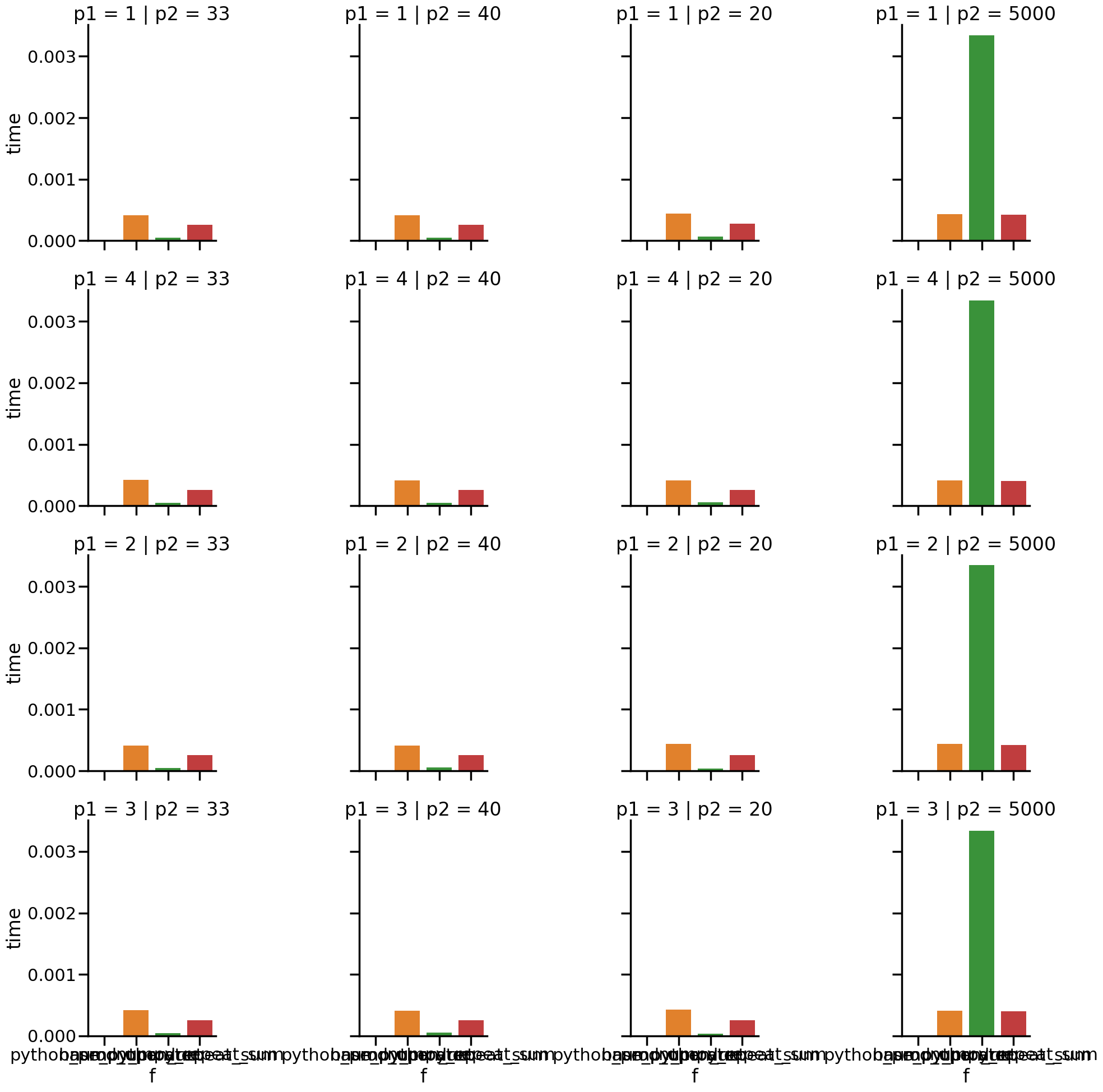
and then we can look at some quick results, even
import seaborn as sns
sns.set_context('poster')
sns.catplot(data =result_df, kind='bar',
            x='f',y='time',row='p1',col='p2',hue='f');
Extensions and Best Practices#
Examples of warnings it can alert you to#
It also throws warnings for a few conditions. We’ll illustrate with a few examples of returning the same experiment above in a few different forms.
# create experiment objects for each
my_expt_list = Experiment(evaluate_multiplication_list,param_grid)
my_expt_S = Experiment(evaluate_multiplication_Series,param_grid)
my_expt_df_bad = Experiment(evaluate_multiplication_bad_df,param_grid)
If is is not a pandas type we see:
my_expt_list.run_test()
/home/runner/work/experiment-tools/experiment-tools/expttools/batch_run.py:151: RuntimeWarning: experiment function does not return a DataFrame, results cannot be saved
  warn(NOT_DF_WARNING,category=RuntimeWarning)
('1_20_python_prod_operator', [20, True, True, 7.483999993951329e-06])
For a series it gives:
my_expt_S.run_test()
/home/runner/work/experiment-tools/experiment-tools/expttools/batch_run.py:149: RuntimeWarning: it returns a series, hint: use `to_frame().T` to make the function compatible
  warn(SERIES_WARNING,category=RuntimeWarning)
('1_20_python_prod_operator',
 res            20
 stat1        True
 stat2        True
 time     0.000007
 dtype: object)
For a single column df (which would interact poorly with being loaded into an ExperimentResult object) we see:
_, tall_df_example = my_expt_df_bad.run_test()
/home/runner/work/experiment-tools/experiment-tools/expttools/batch_run.py:147: RuntimeWarning: the result only has one column, you may want to transpose it (`.T`)
  warn(TALL_DF_WARNING,category=RuntimeWarning)
This is a single column instead of a single row.
tall_df_example
| 0 | |
|---|---|
| res | 20 |
| stat1 | True |
| stat2 | True |
| time | 0.000008 |
The solution is to transpose the result before returning
Customizing the Naming function#
If this is not what we want, we can specify a name_func to use that names the directories
given a dictionary with the same keys as the parameter grid but having only one value.
namer = lambda cp: cp['f'].__name__ + '_' + str(cp['p1'])+ 'x' + str(cp['p2'])

namer({'p1':4,'p2':40,'f':base_python_repeat_sum})
'base_python_repeat_sum_4x40'
We could pass this only at run time, but we cannot validate it if we do that, it is best to re-instantiate the object.
my_expt = Experiment(evaluate_multiplication,param_grid,name_func=namer)
my_expt.get_name_list()
['python_prod_operator_1x20',
 'base_python_repeat_sum_1x20',
 'numpy_product_1x20',
 'numpy_repeat_sum_1x20',
 'python_prod_operator_1x33',
 'base_python_repeat_sum_1x33',
 'numpy_product_1x33',
 'numpy_repeat_sum_1x33',
 'python_prod_operator_1x40',
 'base_python_repeat_sum_1x40',
 'numpy_product_1x40',
 'numpy_repeat_sum_1x40',
 'python_prod_operator_1x5000',
 'base_python_repeat_sum_1x5000',
 'numpy_product_1x5000',
 'numpy_repeat_sum_1x5000',
 'python_prod_operator_2x20',
 'base_python_repeat_sum_2x20',
 'numpy_product_2x20',
 'numpy_repeat_sum_2x20',
 'python_prod_operator_2x33',
 'base_python_repeat_sum_2x33',
 'numpy_product_2x33',
 'numpy_repeat_sum_2x33',
 'python_prod_operator_2x40',
 'base_python_repeat_sum_2x40',
 'numpy_product_2x40',
 'numpy_repeat_sum_2x40',
 'python_prod_operator_2x5000',
 'base_python_repeat_sum_2x5000',
 'numpy_product_2x5000',
 'numpy_repeat_sum_2x5000',
 'python_prod_operator_3x20',
 'base_python_repeat_sum_3x20',
 'numpy_product_3x20',
 'numpy_repeat_sum_3x20',
 'python_prod_operator_3x33',
 'base_python_repeat_sum_3x33',
 'numpy_product_3x33',
 'numpy_repeat_sum_3x33',
 'python_prod_operator_3x40',
 'base_python_repeat_sum_3x40',
 'numpy_product_3x40',
 'numpy_repeat_sum_3x40',
 'python_prod_operator_3x5000',
 'base_python_repeat_sum_3x5000',
 'numpy_product_3x5000',
 'numpy_repeat_sum_3x5000',
 'python_prod_operator_4x20',
 'base_python_repeat_sum_4x20',
 'numpy_product_4x20',
 'numpy_repeat_sum_4x20',
 'python_prod_operator_4x33',
 'base_python_repeat_sum_4x33',
 'numpy_product_4x33',
 'numpy_repeat_sum_4x33',
 'python_prod_operator_4x40',
 'base_python_repeat_sum_4x40',
 'numpy_product_4x40',
 'numpy_repeat_sum_4x40',
 'python_prod_operator_4x5000',
 'base_python_repeat_sum_4x5000',
 'numpy_product_4x5000',
 'numpy_repeat_sum_4x5000']
It is important to validate the name if it is custom.
my_expt.validate_name_func()
True
If you for example, did not use one of the parameter keys this would not pass.
# remove use of f key
bad_namer = lambda cp:  str(cp['p1'])+ 'x' + str(cp['p2'])

bad_expt = Experiment(evaluate_multiplication,param_grid,name_func=bad_namer)
bad_expt.validate_name_func()
False
then we can run the whole experiment
batchname, successes ,fails = my_expt.run_batch()
Using Restart#
Experiment objects have a method restart_batch that allows an experiment to pick up where it left off if it did not finish for some reason. In a real use case,
you would have run above and it did not finish, but you could also use the restart feature
to add more parameter combinations if needed.
Here will simulate a case where something external (eg a server time out) stopped a batch run before it completed by extending the parameter grid we defined above.
param_grid_longer = {'p1':p1_list +[8,9],
             'p2':p2_list+[4892,982],
              'f':fx_list}

my_expt_longer = Experiment(evaluate_multiplication,param_grid_longer,name_func=namer)
This time, instead of calling run_batch we will call restart_batch. You can
tell it which version to run, but here we will let it use defaults.
batchname_restart, success_restart,fail_restart = my_expt_longer.restart_batch()
we can see that by default it uses the most recent run, so there is no new batch name.
batchname_restart, batchname
('evaluate_multiplication2025_10_07_00_38_31_545915',
 'evaluate_multiplication2025_10_07_00_38_31_545915')
And then we will see how it did, by refreshing the results object
my_results = ExperimentResult('results/'+batchname)
but we will store the results in a new DataFrame to confirm the new one is a different size.
result_df_restart = my_results.stack_results()
result_df.shape, result_df_restart.shape
((64, 8), (144, 8))
and we see that it has more results but is otherwise the same and added to the same subfolder (because we loaded from the same place)
Results Folder#
After the results folder is created, it creates a text file with the current versions of all dependencies that experiment tools has installed.
%%bash -s "$batchname"
cat results/$1/dependency_versions.txt
accessible-pygments==0.0.5
alabaster==0.7.16
anyio==4.11.0
astroid==3.3.11
asttokens==3.0.0
attrs==2
5.4.0
babel==2.17.0
beautifulsoup4==4.14.2
build==1.3.0
CacheControl==0.14.3
certifi==2025.10.5
cffi
==2.0.0
charset-normalizer==3.4.3
cleo==2.1.0
click==8.3.0
comm==0.2.3
contourpy==1.3.3
crashtest==0
.4.1
cryptography==46.0.2
cycler==0.12.1
debugpy==1.8.17
decorator==5.2.1
dill==0.4.0
distlib==0.4.0
docutils==0.21.2
dulwich==0.24.2
executing==2.2.1
-e git+https://github.com/ml4sts/experiment-tools
@9aab347c7cf5031e8fa849da0f0bff996053f5ca#egg=expttools
fastjsonschema==2.21.2
filelock==3.19.1
find
python==0.7.0
fonttools==4.60.1
greenlet==3.2.4
h11==0.16.0
httpcore==1.0.9
httpx==0.28.1
idna==3.10
imagesize==1.4.1
importlib_metadata==8.7.0
iniconfig==2.1.0
installer==0.7.0
ipykernel==6.30.1
ipyt
hon==9.6.0
ipython_pygments_lexers==1.1.1
isort==6.1.0
jaraco.classes==3.4.0
jaraco.context==6.0.1
j
araco.functools==4.3.0
jedi==0.19.2
jeepney==0.9.0
Jinja2==3.1.6
jsonschema==4.25.1
jsonschema-speci
fications==2025.9.1
jupyter-book==1.0.4.post1
jupyter-cache==1.0.1
jupyter_client==8.6.3
jupyter_cor
e==5.8.1
keyring==25.6.0
kiwisolver==1.4.9
latexcodec==3.0.1
linkify-it-py==2.0.3
markdown-it-py==3.
0.0
MarkupSafe==3.0.3
matplotlib==3.10.6
matplotlib-inline==0.1.7
mccabe==0.7.0
mdit-py-plugins==0.5
.0
mdurl==0.1.2
more-itertools==10.8.0
msgpack==1.1.1
myst-nb==1.3.0
myst-parser==3.0.1
nbclient==0.
10.2
nbformat==5.10.4
nest-asyncio==1.6.0
numpy==2.3.3
packaging==25.0
pandas==2.3.3
parso==0.8.5
pb
s-installer==2025.9.18
pexpect==4.9.0
pillow==11.3.0
pkginfo==1.12.1.2
platformdirs==4.4.0
pluggy==1
.6.0
poetry==2.2.1
poetry-core==2.2.1
prompt_toolkit==3.0.52
psutil==7.1.0
ptyprocess==0.7.0
pure_ev
al==0.2.3
pybtex==0.25.1
pybtex-docutils==1.0.3
pycparser==2.23
pydata-sphinx-theme==0.15.4
Pygments
==2.19.2
pylint==3.3.9
pyparsing==3.2.5
pyproject_hooks==1.2.0
pytest==8.4.2
python-dateutil==2.9.0.
post0
pytz==2025.2
PyYAML==6.0.3
pyzmq==27.1.0
RapidFuzz==3.14.1
referencing==0.36.2
requests==2.32.
5
requests-toolbelt==1.0.0
rpds-py==0.27.1
scipy==1.16.2
seaborn==0.13.2
SecretStorage==3.4.0
setupt
ools==80.9.0
shellingham==1.5.4
six==1.17.0
sniffio==1.3.1
snowballstemmer==3.0.1
soupsieve==2.8
Sph
inx==7.4.7
sphinx-book-theme==1.1.4
sphinx-comments==0.0.3
sphinx-copybutton==0.5.2
sphinx-jupyterbo
ok-latex==1.0.0
sphinx-multitoc-numbering==0.1.3
sphinx-thebe==0.3.1
sphinx-togglebutton==0.3.2
sphi
nx_design==0.6.1
sphinx_external_toc==1.0.1
sphinxcontrib-applehelp==2.0.0
sphinxcontrib-bibtex==2.6
.5
sphinxcontrib-devhelp==2.0.0
sphinxcontrib-htmlhelp==2.1.0
sphinxcontrib-jsmath==1.0.1
sphinxcont
rib-mermaid @ git+https://github.com/brownsarahm/sphinxcontrib-mermaid@266b38acd5d2edd3362ea3bbb4f1b
df3e7aa6109
sphinxcontrib-qthelp==2.0.0
sphinxcontrib-serializinghtml==2.0.0
SQLAlchemy==2.0.43
stac
k-data==0.6.3
tabulate==0.9.0
tomlkit==0.13.3
tornado==6.5.2
traitlets==5.14.3
trove-classifiers==20
25.9.11.17
typing_extensions==4.15.0
tzdata==2025.2
uc-micro-py==1.0.3
urllib3==2.5.0
virtualenv==20
.34.0
wcwidth==0.2.14
wheel==0.45.1
zipp==3.23.0
zstandard==0.25.0